OurPact – Parental Control App
- 2.6
- Rating
- 1.00M
- Installs
- Free
- Price

 Analysis by App-foxy
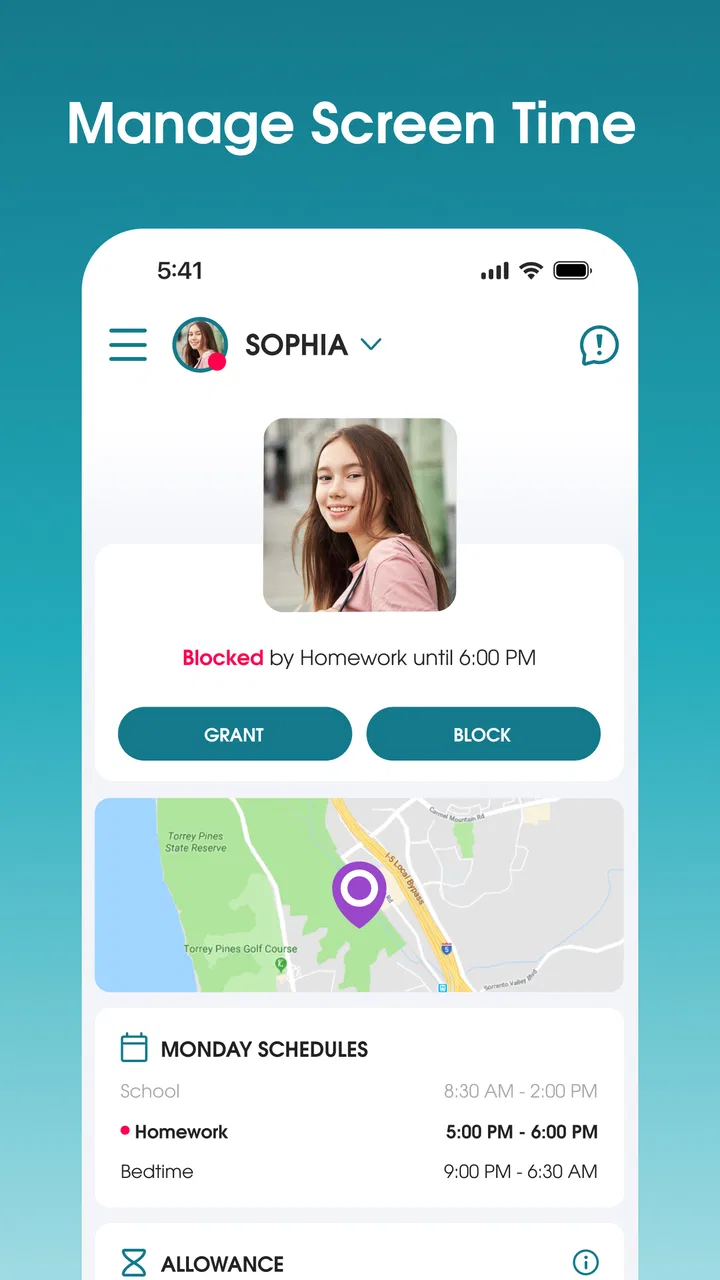
I approached OurPact as a practical family-management tool rather than a simple phone tracker. Developed by Eturi Corp., this free lifestyle app brings together family locating, app blocking, screen-time allowance, and text blocking in one place. That combination is useful because parents usually need several kinds of boundaries at once: knowing where a child is, deciding when a device can be used, and reducing distractions without taking the phone away every time.
My overall impression is mixed but fairly clear. The idea is strong, and the app can become genuinely helpful when a family agrees on rules and uses them consistently. At the same time, it is not a set-it-and-forget-it solution. Its usefulness depends on careful setup, regular conversations, and accepting that technical controls cannot replace trust. With a 2.6 average from roughly two thousand ratings, the experience clearly has friction for some users, so I would recommend approaching it as a structured tool rather than expecting effortless control.
Building a baseline routine that the whole family understands
The best way to begin is with a simple routine. I would not start by blocking everything or creating a complicated schedule. Instead, I would first decide what the device is for during the day. Is it mainly needed for school communication, travel, emergencies, or entertainment? That answer affects how aggressively app blocking and screen-time allowance should be used.
You May Also Like

 Blood Strike: 2.5 Anniversary
Blood Strike’s Loadouts Turn Every Drop Into a Tactical Gamble
A close look at Blood Strike’s custom loadouts: how fast access to signature weapons reshapes its battle royale rhythm, rewards preparation, and narrows the gap between fights.

 Pandora - Music & Podcasts
Pandora’s Music Is Easy to Start, but Harder to Recover
Pandora’s strength is its low-effort path from a seed to a station. Its weak spot is how much confidence it asks you to place in connection, setup, and quiet recovery.

 8 Ball Pool
 Is Built on Rivalries, Rematches, and Routine
A close look at the rivalries, rematches, shared routines, and unanswered safety questions that turn a quick pool match into a persistent mobile community.

 Samsung Music
’s Quiet Strength Is Playing What You Already Own
Its reach comes less from spectacle than from dependable access to a personal library. That simplicity is both the app’s strongest retention engine and its ceiling.

 AccuWeather: Weather Radar
AccuWeather Review: A Quick, Clear Forecast for Everyday Decisions
For everyday plans, the best forecast is the one you can understand quickly. AccuWeather makes rain timing, radar, and local conditions easy to act on, with a few trade-offs.

 Hill Climb Racing
Why Hill Climb Racing Still Turns Crashes Into One More Run
A tiny car, a bumpy hill and one more upgrade: Hill Climb Racing keeps resurfacing because its simple chaos makes every near-miss feel personal.
More From Our News Desk



A useful first arrangement is to establish a normal daily allowance, then add exceptions for moments when the phone has a legitimate purpose. For example, a child may need access before school to coordinate a ride, during the afternoon for homework communication, and after dinner for a limited period of personal use. The important point is to make the rule predictable. If access changes randomly, the app can feel like punishment rather than a family agreement.
I also recommend explaining the arrangement before activating it. A child who knows that entertainment apps are restricted during study time is more likely to understand the boundary than a child who suddenly finds several apps unavailable. OurPact works best when the parent decides the framework and the child knows how to ask for a reasonable adjustment. That conversation is not an optional extra; it prevents many of the arguments that otherwise get blamed on the app.
The family-locator side fits naturally into this routine. I see it as most useful for practical coordination, such as checking whether a teenager has arrived at school or is on the way home. It is less healthy when used as a constant substitute for communication. Location information can answer “where are you?” but not “are you safe?” or “why are you delayed?” I would still expect family members to send a message when plans change.
One everyday example shows where the app can earn its place. Imagine a child leaving school, stopping at an agreed location, and then needing the phone for a pickup message. A parent can use location awareness for coordination, while screen-time rules keep games and social distractions from taking over the afternoon. The value comes from combining the tools around a real routine, not from any single control.
Because the app is rated for Everyone, its presentation is accessible to a broad family audience. That does not mean every setting is suitable for every age. A younger child may need firmer limits, while an older teenager may respond better to scheduled boundaries and more privacy. I would adjust the approach as the child becomes more independent instead of keeping the same restrictions indefinitely.
What I would check before relying on it
Before creating rules, I would confirm that every family member is using the intended device and account arrangement. A parental-control system is only as reliable as its setup. If one device is missing, assigned incorrectly, or not following the expected schedule, the parent may think a rule is active when the real problem is configuration.
I would also test one small rule during a calm part of the day. Blocking a single nonessential app is safer than experimenting during school, travel, or an emergency. This gives the family a chance to see how the restriction feels and how an access request should be handled. It also helps reveal whether the chosen rule is too broad.
Another sensible habit is to review the arrangement after several days. The first plan is rarely perfect. A bedtime limit may be too early for a child who needs evening homework access, while a broad app block may interfere with a useful communication tool. Small revisions are easier to accept than a complete overhaul after frustration has built up.
Settings worth checking before creating strict boundaries
The screen-time allowance deserves more thought than simply choosing a large or small amount of time. I would divide the day into purposes: school, family coordination, personal use, and sleep. Even if the app does not replace a family timetable, thinking in these categories makes the settings more reasonable. A child may need a phone available without needing every app available.
That distinction is one of the most useful ideas in the whole experience. Screen access and app access are not always the same thing. A parent might allow communication while restricting games, or permit a navigation tool during travel while limiting entertainment. This is more flexible than treating the phone as one indivisible object.
App blocking should be selective at first. I would begin with the apps that cause the clearest problem, such as games that extend past bedtime or social tools that interrupt homework. Blocking a large collection immediately can create unnecessary resistance and may affect apps that serve a practical purpose. The goal is not to make the device useless; it is to make the agreed routine easier to follow.
Text blocking needs especially careful judgment. Messages can be distracting, but they can also be important for family logistics, school matters, or emergencies. I would avoid using a blanket approach when a narrower rule can solve the problem. If text restrictions are part of the plan, the family should decide in advance how urgent communication will work.
Location features also benefit from clear expectations. I would tell the child when location information is being used for pickup coordination, after-school safety, or travel. That keeps the feature connected to a specific purpose instead of turning it into invisible surveillance. For older children, explaining the reason behind location sharing may matter as much as the setting itself.
The current version is 9.18.5, and the app requires operating system version 10 or later. In practical terms, I would check compatibility before planning a family rollout, especially if one device is older. A family system that works on the parent’s phone but not on the child’s phone will create confusion from the beginning.
Cost is another setting-related consideration. The app is free to install, but it includes in-app purchases ranging from $1.99 to $99.99 per item. I would review the purchase choices carefully before committing to a long-term arrangement. Families should decide whether the controls they actually need justify any paid option, rather than assuming every feature is included at no cost.
There is also a psychological setting that cannot be changed in a menu: the level of independence the child is ready for. A strict configuration may be appropriate for a young child, but the same approach can damage cooperation with a teenager. I would use the least restrictive arrangement that solves the real problem, then tighten it only when there is a specific reason.
Using repeatable habits instead of constant intervention
Experienced use is less about changing rules every hour and more about creating repeatable patterns. A parent could review the next day’s plan in the evening, make one adjustment if necessary, and then leave the settings alone. This is calmer than reacting to every request as though it were a new negotiation.
Another useful habit is to keep exceptions temporary and specific. If a child needs extra access for a project, travel, or a family event, I would treat that as an exception tied to the situation rather than permanently weakening the normal schedule. Once the situation ends, the regular arrangement can resume without a dramatic reset.
I would also pair digital restrictions with physical routines. Charging phones outside bedrooms, placing devices in a common area during homework, and agreeing on when messages should be answered can reduce the burden on app controls. OurPact is more effective when it supports these habits instead of being expected to solve every behavior problem by itself.
Parents should keep the number of active rules manageable. Too many restrictions become difficult to remember and harder to explain. A short set of rules that everyone can describe is usually stronger than a complicated collection of exceptions. This is a less obvious advantage of taking time with setup: the app becomes easier to live with because the family understands the logic behind it.
Faster patterns for busy families
The quickest workable pattern is to create a normal day, then make only the changes that differ from it. For instance, a school day might have one arrangement, while weekends allow a different balance between entertainment and communication. The exact schedule should reflect the family’s life, but the principle remains the same: repeatable defaults reduce daily decisions.
I would avoid rebuilding the entire plan whenever a child asks for extra time. First, identify what is actually needed. If the request is to contact a parent, broader access may be unnecessary. If the request concerns homework, blocking entertainment apps may still be reasonable. Separating the purpose from the request prevents a small need from turning into unlimited access.
When a restriction causes trouble, I would change one variable at a time. If several apps are unblocked, the allowance is increased, and text blocking is removed all at once, it becomes impossible to know which change solved the issue. A controlled adjustment may feel slower, but it produces a much more dependable family routine.
For travel days, I would prepare before leaving rather than trying to manage settings in a car or at an airport. Location awareness can help with meeting points, while communication access may be more important than usual. Entertainment limits can still remain, but the priority should be making sure the phone serves its practical purpose.
For bedtime, consistency matters more than severity. A rule that begins at a predictable time every night is easier to follow than one that changes according to a parent’s mood. I would also explain what happens in the morning, so the child does not experience the restriction as an unexplained loss of access.
These patterns make the app less intrusive. Instead of repeatedly checking whether a child is using the phone, the parent creates a structure and checks in at sensible moments. That is where the combination of location, blocking, and allowance can be more useful than separate single-purpose tools.
Where the faster approach can fail
Speed should not come at the expense of testing. A rushed setup can block a communication channel or create a conflict during an important moment. I would never introduce a major restriction immediately before school, a trip, or a family event. A short trial at home is a much safer way to find problems.
It is also easy to mistake an app restriction for a complete solution. A child may still be distracted by another available activity, or may need help learning how to manage free time without constant prompts. The app can reduce access, but it cannot teach self-control on its own.
Families should be prepared for disagreement. If a child believes the rules are unfair, technical enforcement may produce workarounds, arguments, or secrecy rather than better habits. I would treat repeated conflict as a sign to revisit the agreement, not simply add more blocks.
Advanced limits and situations where another option is better
OurPact is appealing because it gathers several parental-control functions under one roof, but that convenience also creates dependence on one system. If a family only needs basic bedtime limits, the built-in controls on a phone may be simpler and less expensive. A dedicated location service may be a better fit for relatives who mainly want travel coordination without app blocking or screen-time management.
I would also hesitate to recommend it to adults who want completely invisible monitoring. Healthy family use requires clear expectations, especially when location and communication controls are involved. If privacy is a central concern, a direct conversation and a narrower tool may be more appropriate than a broad parental-control arrangement.
The app may not suit a child who needs unrestricted access to communication for medical, educational, or travel reasons. In that situation, blocking must be designed with exceptional care. A parent should identify essential contacts and functions before restricting anything related to messages or general device access.
Another limitation is that rules can become outdated as a child’s schedule changes. A configuration that worked during one school term may be wrong during holidays, exam periods, sports activities, or a new commute. I would put a recurring reminder on the family calendar to review the arrangement, rather than waiting for a serious problem.
The purchase range also means families should think about long-term value. Free installation is attractive, but the total experience may depend on which optional items a household chooses. I would compare that potential cost with the price and simplicity of the phone’s built-in tools before making the app the center of the family’s routine.
Its audience is broad, but the best results require a parent willing to maintain the system. Someone looking for instant, automatic discipline may become frustrated. Someone prepared to explain rules, test changes, and review the plan can get much more from it.
The scale of adoption shows that the concept has reached a substantial audience, with more than one million installs. That makes it easy to understand why families consider it, but popularity alone does not guarantee a smooth experience on every device or in every household. I would use the rating and the number of reviews as a reminder to test carefully rather than as a final verdict.
My verdict after using it as a family routine
I see OurPact as a planning tool with enforcement features, not as a replacement parent. Its strongest use is a family that wants one organized approach to location awareness, app blocking, screen-time allowance, and text restrictions. The app becomes particularly practical when parents create a normal routine, keep exceptions limited, and explain the reasons behind each boundary.
My recommendation is to start modestly: establish one screen-time pattern, restrict only the clearest distractions, test the arrangement, and then add other controls when the family understands the first layer. That workflow reduces accidental overblocking and makes it easier to identify whether the app is genuinely helping.
I would recommend it to parents who need more structure than basic phone settings provide and who are comfortable reviewing rules as children grow. I would skip it if the household only needs a simple bedtime reminder, if privacy concerns make location sharing unacceptable, or if the family is unwilling to discuss and maintain the rules.
The free entry point makes it reasonable to evaluate, while the optional purchases deserve attention before a long-term commitment. The age rating is Everyone, and the app is available for devices running operating system version 10 or later, so compatibility should be checked across the whole family before setup.
In the end, OurPact is most valuable when it supports a clear agreement rather than trying to create one by force. I would not present it to a child as a hidden tracking mechanism or a punishment switch. I would present it as a shared system for deciding when a phone helps the family and when it gets in the way. Used with that mindset, it can provide useful structure; used without it, the controls may simply move the conflict from the living room to the screen.
FAQs for OurPact – Parental Control App
01What is OurPact – Parental Control App and what can parents use it for?
OurPact is a parental-control app designed to help families manage children’s digital habits across supported devices. Parents can typically create schedules, set screen-time limits, block or allow applications, pause internet access, and review certain activity information from a parent dashboard. The available controls may depend on the child’s device, operating system, subscription plan, and the permissions granted during setup.
02Which devices and operating systems are compatible with OurPact?
OurPact is intended for use with Android and iOS devices, but its features are not necessarily identical on both platforms. Before downloading, parents should check the current compatibility information in the Google Play Store or Apple App Store and confirm that the child’s device meets the requirements. Some controls may require installing a companion application or profile on the child’s device.
03Does OurPact let parents schedule screen time and block apps?
Yes, scheduling and app-management tools are among OurPact’s main purposes. Parents can create periods when a child’s device is available or restricted, such as school hours, bedtime, or family time. Depending on the plan and operating system, parents may also be able to approve, restrict, or block selected applications. Device permissions must remain active for these controls to work reliably.
04Is OurPact free, or does it require a subscription?
OurPact may offer limited features at no cost, while more advanced controls are generally connected to a paid subscription or premium plan. Pricing, trial availability, included features, and the number of supported devices can change over time and may differ by region. Parents should review the subscription details before starting a trial, especially the renewal terms and cancellation process.
05Does OurPact monitor private messages, and what privacy issues should parents consider?
OurPact’s monitoring capabilities depend on the device platform, permissions, and current product features. Parents should not assume that every message, website, or activity can be viewed, because operating-system restrictions may limit access. Before installation, families should read the privacy policy, understand what information is collected and shared, and discuss the app openly with children to encourage trust and responsible technology use.
Pros
- Clear screen-time schedules help establish consistent daily routines.
- Location features can help parents check where children are.
- App blocking offers useful control over distracting or unsuitable apps.
- Multiple child profiles make it practical for managing several devices.
- Activity reports provide helpful insight into device habits and usage patterns.
Cons
- Some advanced controls require a paid subscription.
- Children may find ways to bypass restrictions on certain devices.
- Location tracking can reduce privacy and may affect battery life.
- Setup can be time-consuming
- especially across multiple operating systems.
- A stable internet connection is needed for many controls to update properly.

OurPact – Parental Control App
Gallery